
WhatsApp rolls out new media download quality feature for beta users

Meta’s messaging giant WhatsApp is handing users more control over their data usage and storage with a brand-new feature — the ability to choose the quality of automatically downloaded media.
The feature, currently available to select beta testers on WhatsApp beta for Android version 2.25.18.11, lets users decide whether incoming photos and videos should be saved in “standard quality” or “HD quality.” The option can be found under the “Storage and Data” section in the app’s settings.
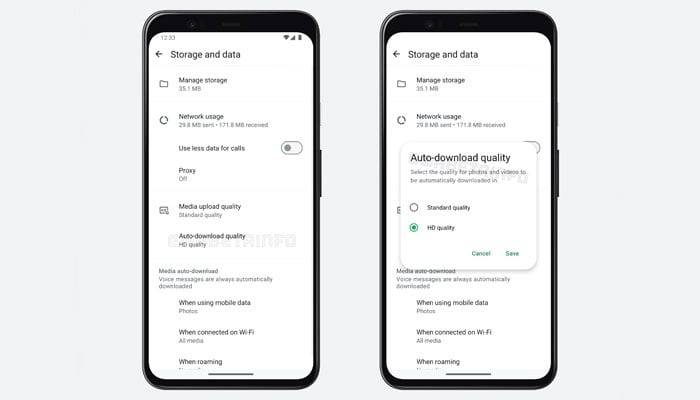
According to WhatsApp news tracker WABetaInfo, this update addresses one of the most common complaints among users: the flood of high-resolution media in group chats, which clogs up both data plans and phone storage.
Here’s how it works:
Standard Quality: Compresses the media for faster downloads and reduced data/storage usage.
HD Quality: Retains higher resolution, offering clearer visuals at the cost of more data and space.
Behind the scenes, the app now employs a dual-upload mechanism when users send HD media. It uploads both standard and HD versions of a file (thanks to end-to-end encryption, compression can’t happen server-side). The recipient’s app then downloads the version that matches their preset preference — smart, right?
If you choose to download only standard quality by default but later want to view the HD version, you can still manually request it from the server (as long as it hasn’t expired).
This update is especially valuable for those with limited data plans or unreliable connections, while still giving high-res lovers the option to keep their images crisp.
WhatsApp plans to expand this feature to all users in the coming weeks — so sit tight. Until then, beta testers are already enjoying the freedom to download smarter, not harder.